QR✓OK Connect your venueConnect

Waiter on a smartphone

In a venue on Poster the waiter takes the order at the table on their own phone: opens an order for the table, adds dishes from the Poster menu, sends the kitchen ticket and prints the pre-bill — without walking to the register. Everything goes straight into the order in Poster, and the venue's register prints the ticket and the pre-bill. The «Poster+» plan.

What it gives the venue

The waiter takes the order at the table and hardly walks to the register or the kitchen. At peak hours the same waiters serve more tables, and where three were needed, two cope.

Without a phone

A notepad at the table, Poster only at the register

  1. TableWrites the order on a notepad~1 min
  2. HallCrosses the hall to the register, waits for it to be free1–2 min
  3. RegisterTypes the order into Poster~1 min
  4. RegisterNo honey cake — the stop list shows only here
  5. HallWalks back to the table~30 s
  6. TableThe guest picks another dessert~30 s
  7. HallBack to the register again~30 s
  8. RegisterAdds it to the order; the kitchen ticket goes out~30 s

In all, roughly5–6 min

Three trips across the hall, half the time spent walking and at the register

Waiter on a smartphone

All at the table, Poster in the phone

  1. TableOpens the table in the app~5 s
  2. TableAdds the dishes by search as the guest orders; the honey cake is marked «on stop» at once~1 min
  3. TableSuggests another while the guest is there~20 s
  4. TableTaps «Kitchen ticket» — the register prints it for the kitchen~5 s

In all, roughly~1.5 min

The waiter stays with the guests; the kitchen starts cooking 4 minutes sooner

Example: an order of four dishes, one of them on the stop list. Times are rough: they depend on the hall and the queue at the register.

The order is in the kitchen at onceThe ticket goes from the table, not after a walk to the register, and there is no queue of waiters at it.
«Ready» on the phoneThe kitchen marks a dish ready and the waiter gets a notification. No checking the pass, hot food does not wait.
Tables free up soonerThe pre-bill prints from the phone, and the guest pays by the UzQR on it — no terminal, no change.
Fewer mistakesThe order is built from the Poster menu with the required modifiers and a note for the kitchen, not on paper.
Fewer lost ordersThe stop list is on the phone: the guest hears at once what is off and picks something else while the waiter is there, not after a trip to the register.
Order in the ordersEvery order has a history: who added or removed what. What went to the kitchen from a phone cannot be taken back from it.
No tablets, no extra registersIt all runs on the waiter's phone, as an app on its home screen.
The register is always thereThe phone works through Poster, so the orders are always in the register. Internet down or phone dead — the waiter walks to the register, logs in with their PIN and carries on with the same order.
New staff up to speed soonerMenu search, the popular dishes on top, the modifiers asked for by the app — no menu to learn by heart.
More tipsA tips code on every pre-bill: a guest without cash can tip too. Waiters earn more and leave less often.

What it looks like

Screens of the «Orders» app at the fictional Laylak Coffee. It opens in the phone's browser and goes on the home screen as an icon — no app store.
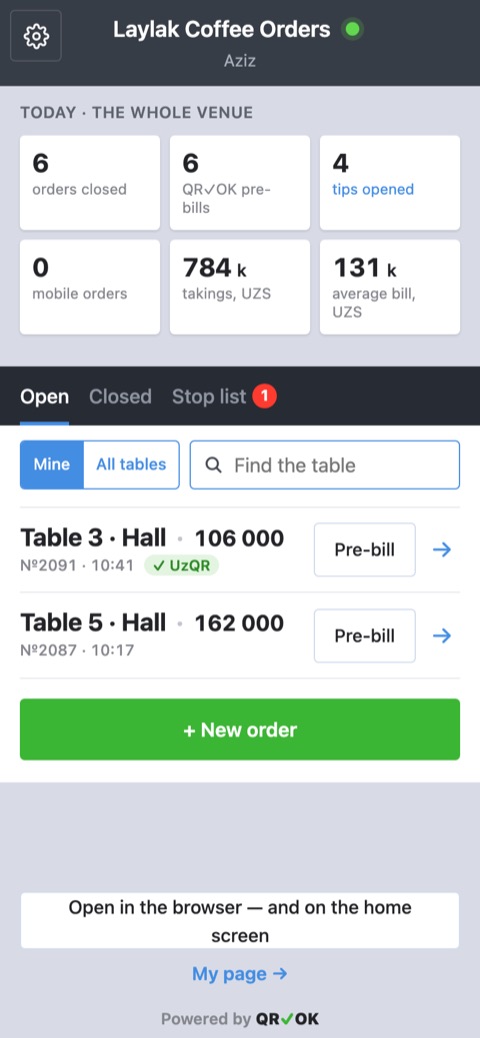
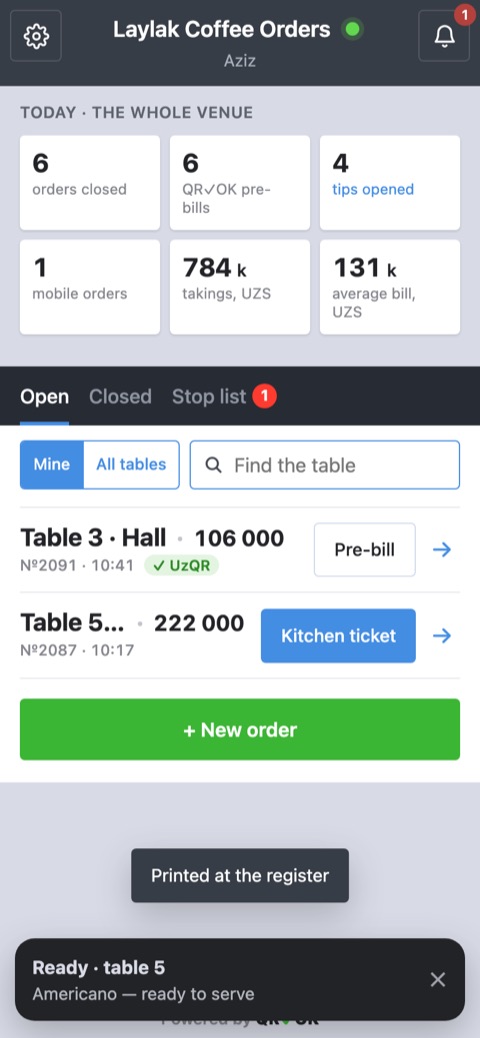
The orders list: «Today» tiles, the «Open», «Closed» and «Stop list» tabs, tables 3 and 5 with a «Pre-bill» button, «+ New order» below
Orders. Mine and all tables, the day’s totals for the venue, a pre-bill right from the list.
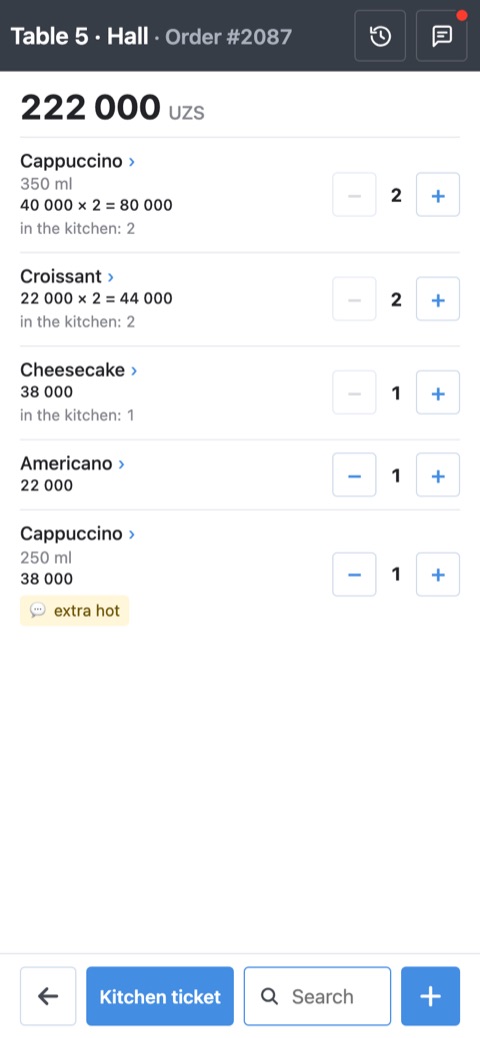
The order «Table 5 · Hall»: dishes with − and + buttons, «Kitchen ticket», «Search» and a blue «+» at the bottom
The order. Dishes with − and +, what is already in the kitchen, «Kitchen ticket», search and + at the bottom.
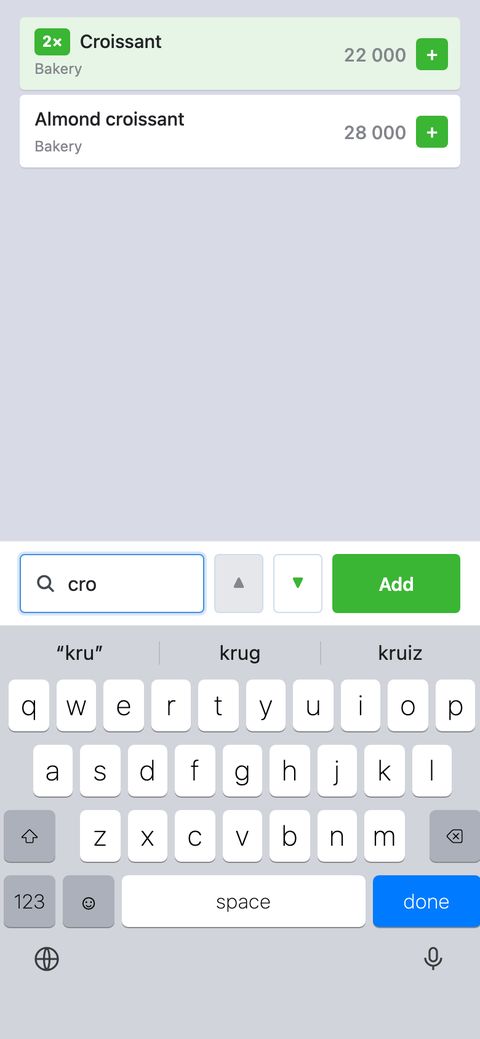
Search «kru»: «Croissant» and «Almond croissant» found, arrows and a green «Add» button at the bottom
Menu search. Arrows through what is found, «Add» puts it in the order.
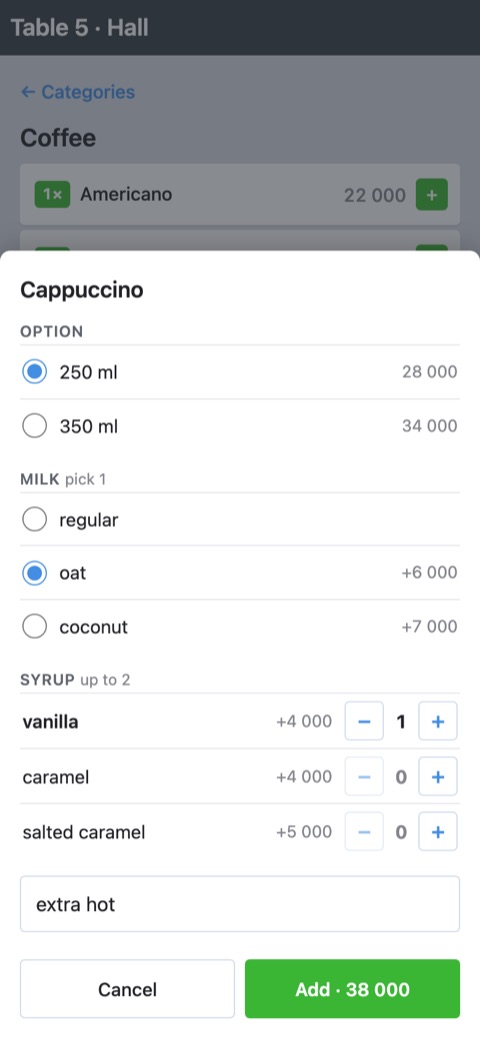
The «Cappuccino» sheet: 250 ml, oat milk, vanilla syrup, a note and the «Add» button
Options. Size, milk, syrups and a note for the kitchen.
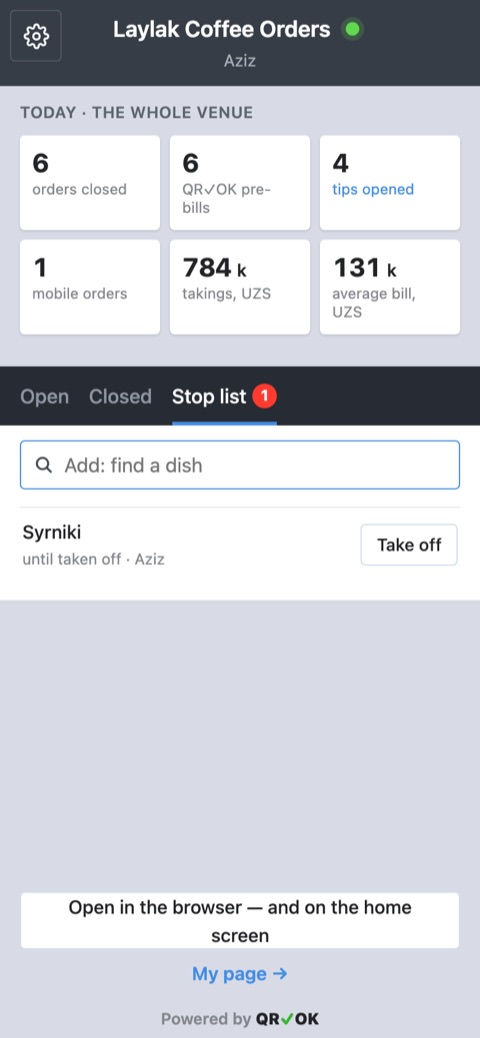
The «Stop list» tab: a field to add a dish and a dish on stop with a «Remove» button
Stop list. The manager puts a dish on stop — the waiters see it at once.
The orders list with a «Ready · table 5» notification at the bottom
«Ready». The kitchen marks a dish — the waiter gets a notification.

What the venue needs

What it costs

Poster+ 80,000 UZS Per waiter who takes orders on the phone, per month, plus 100,000 UZS per point. No bundles: you pay only for those who used it. Everything in «Tips+»: UzQR on the pre-bill and QR tips for every waiter.

A waiter who took at least 10 orders on the phone in the month counts at 80,000 UZS; one who did not use the phone but worked with tips at 20,000 UZS. We are in a pilot now: everything is free. On top of that, each point pays nothing for the month in which its first pre-bill is printed and for the whole of the next month. We give at least 30 days' notice before billing starts.

Compared with the registers' mobile waiter

What a waiter who takes orders on the phone costs a month on top of the register itself, in UZS a month (iiko — iikoWaiter, r_keeper — r_k Waiter):

Waiters QR✓OK Poster iiko r_keeper
3 340k 318k 332k 332k
5 500k 530k 553k 484k
10 900k 1.06m 1.11m 830k
15 1.3m 1.59m 1.66m 1.31m

The QR✓OK amount already includes the 100,000 UZS point fee, and with it QR tips for every waiter, UzQR bill payment on the pre-bill and the stop list. The register's mobile waiter only takes orders; tips are connected as a separate service.

Sources: Poster — the Uzbekistan plan, $9 a month per mobile waiter (joinposter.com) — the mobile register page says it comes in a bundle of at least three devices; iiko and r_keeper — the vendors' 2026 price lists for Russia: iikoWaiter — 800 ₽ a month per device, r_k Waiter — 800 ₽ per device or packs of 5 and 10 devices for 3,500 and 6,000 ₽. Converted at the Central Bank of Uzbekistan rate of 6 October 2026: $1 = 11,778 UZS, 1 ₽ = 138 UZS. Dealers in Uzbekistan may charge differently.

What the waiter can do on a smartphone

QR✓OKPoster+PosterMobile WaiteriikoiikoWaiterr_keeperr_k Waiter
Order: menu, modifiers, commentsyesyesyesyes
Kitchen ticket from the phoneyesyesyesyes
Shows whether the ticket printedyes, and why notconnection error only«printed» statusnot described
Pre-bill from the phoneyesyesyesyes
Payment and closing the order on the phoneno, at the register onlynot describedyesyes
Move an order to another tablenonot describedyesyes
Split the billnonot describedyesyes
Void a dish already sent to the kitchenno, at the register onlynot describedyes, with a permissionyes, with a permission
Stop list on the phoneyespaid app; on the phone not describedyesyes
Manager edits the stop list from the phoneyesnot describedno, at the register onlypaid licence
Find the table by a dishyesnot describednot describednot described
Own sales for the dayyesnot describedyesnot described
Installnone: browser or Telegraman app, smartphones onlyan app from the storean app from the store
What the venue needs on sitea Poster register with the QR✓OK appnothing, the cloud onlyan iikoFront register with WaiterServerthe r_keeper cash server
Works without internetno — the order carries on at the registerpartly, sources disagreepartly, over Wi-Fi to the registerpartly, drafts

Bill payment by UzQR on the pre-bill and QR tips for every waiter are left out of the table: they belong to the pre-bill, not to the waiter's app. They come with «Poster+», and on iiko and r_keeper the pre-bill template prints them.

«Waiter on a smartphone» in QR✓OK is for venues on Poster. From the vendors' documentation as of 7 October 2026: the Poster knowledge base and its mobile register page (knowledge-base.joinposter.com, joinposter.com/tour/mobile-pos), the iikoWaiter documentation — the app is made by a third-party developer, Arbus, certified by iiko (arbus.atlassian.net), the r_k Waiter documentation (docs.rkeeper.ru). On Poster working offline the sources disagree: the mobile register page says «works without internet over shared Wi-Fi», the knowledge base says registers do not sync without internet. «Not described» means the documentation does not say; Poster describes many features for the full register only.

Getting started

  1. Connect QR✓OK on Poster — step by step, about 10 minutes.
  2. Write to us in @qrokuzbot which waiters should get orders and the pre-bill from the phone.
  3. Invite the waiter: in the manager's cabinet «⋯» → «Invite» — a QR code or an SMS. The waiter opens «Orders» already signed in, with no password.
  4. The waiter adds «Orders» to the phone's home screen and opens it from the icon from then on.

Connect on Poster Waiter's guide

Questions

Internet down or phone dead — what then?
Walk to the register. The orders live in Poster, not with us: everything the waiter did on the phone is already in the order on the register. The waiter logs in to Poster with their PIN and carries on with the same order as usual — adds dishes, prints the kitchen ticket and the pre-bill. Once the connection is back, the phone shows the same order with every change made at the register.
The register is off — what still works?
While the register with the QR✓OK app is not connected, orders on the phone can only be viewed: a new order, dishes, comments, the kitchen ticket and the pre-bill are unavailable — their buttons fade, and a tap says why. A register in Poster's offline mode keeps its own copy of the order, and a change from a phone meanwhile would get lost or double a dish. Turn the register on and open the QR✓OK app on it: once the dot on top is green again, everything works.
Who sees my changes?
Every change is written into the order in Poster — it shows at the register and in Poster's back office, and other waiters see it under «All tables». On top of that, we log every change made from a phone: which waiter changed what, and when. Poster's own history does not name the waiter for such changes, so when something needs sorting out, the manager asks us.
Can I close or pay the order from the phone?
No. From the phone an order is opened, added to, and its kitchen ticket and pre-bill are printed. Payments are taken and orders are closed at the register as usual, including when the guest pays by QR.
Can I remove a dish that is already in the kitchen?
Not from the phone. An administrator does it at the register, as with any order in Poster.