 QR✓OK
Connect your venueConnect
QR✓OK
Connect your venueConnect
Nothing is installed on the r_keeper register. Our two codes — UzQR with the bill amount and the tips QR — are part of the pre-bill layout and print at the bottom of every pre-bill when the waiter presses the usual «Пречек» button. Staff have no extra buttons. The layout is set up once by the r_keeper dealer or the venue's IT person in the manager station — about 15–20 minutes.
Installing QR✓OK for venues as a dealer? The partners' guide — QR✓OK for R-Keeper dealers.
The whole pre-bill stays yours; our block goes at the very bottom.
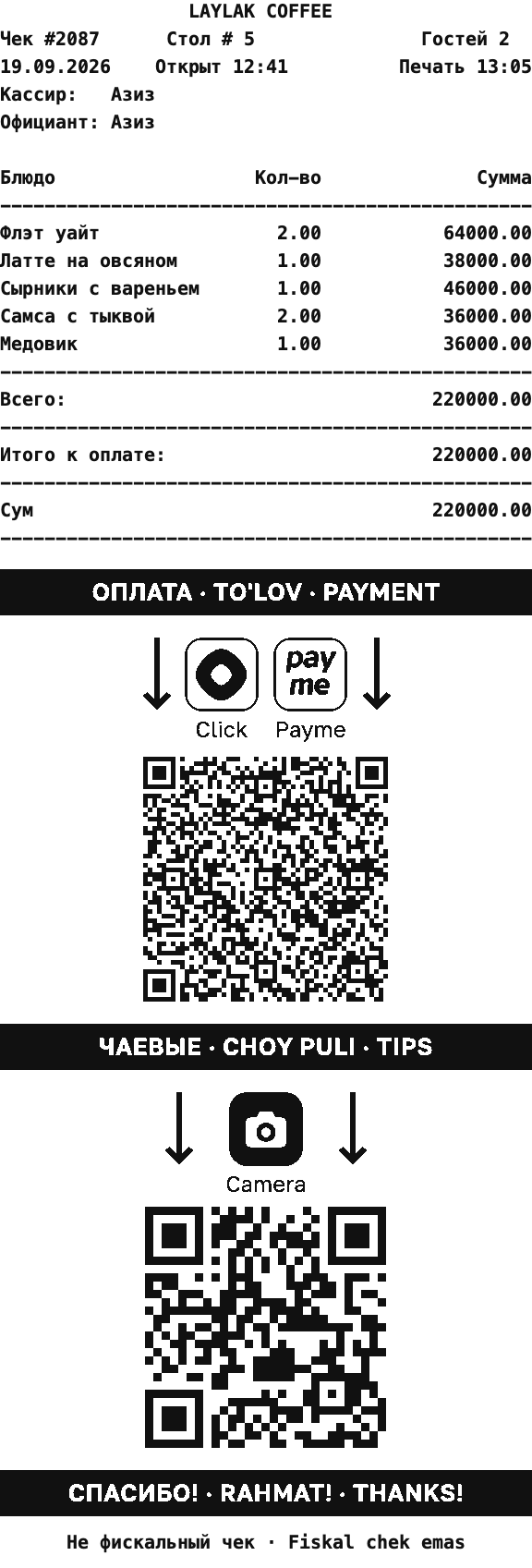
The bands and icons print as pictures on EPSON-compatible thermal printers; for other printers there is a text-only variant.
The codes print only while something is left to pay on the bill.
While printing, the register tells us about the pre-bill and takes the current UzQR code and plan from our server: a new code from the bank reaches the register by itself, the layout stays. Without internet the pre-bill prints as usual — with what the register kept last time.
Everything is done in the r_keeper manager station. We send two files: qrok-rkeeper-prebill-<number>.mak — a ready layout based on r_keeper's stock pre-bill, and qrok-rkeeper-prebill-<number>.pas — the script for a venue with its own pre-bill design.
The waiter in the tips code is their «Код» in r_keeper; nothing to set up for that. If pre-bills are printed by a fiscal printer with a different driver, write to us and we will help with the settings.
A waiter appears in the manager's cabinet after the first pre-bill with their code. The cabinet opens in the bot: Menu → «Manage». There each waiter's «⋯» menu has «Invite» — a link through which the waiter enters @qrokuzbot and adds a card number or a Click link. From then on, tips on their code go to them.
Want the waiters listed right away, with names? Send us their r_keeper codes and names.
Create a Telegram group and add the bank's bot @cbu_uzqrbot and @qrokuzbot. Send /chatid in the group — the bot replies with the group number. In the uzqr.uz cabinet, next to your code tap ⋮ → «Привязать к боту Telegram» (Link to Telegram bot) and paste that number. Payment notices will come to the group, and we will show payment statistics by pre-bill. Step by step with screenshots.
Questions — to @qrokuzbot, business days 9:00–21:00 Tashkent time. Terms — in the Public Offer.