Help › For managers › Kitchen screen
Kitchen screen
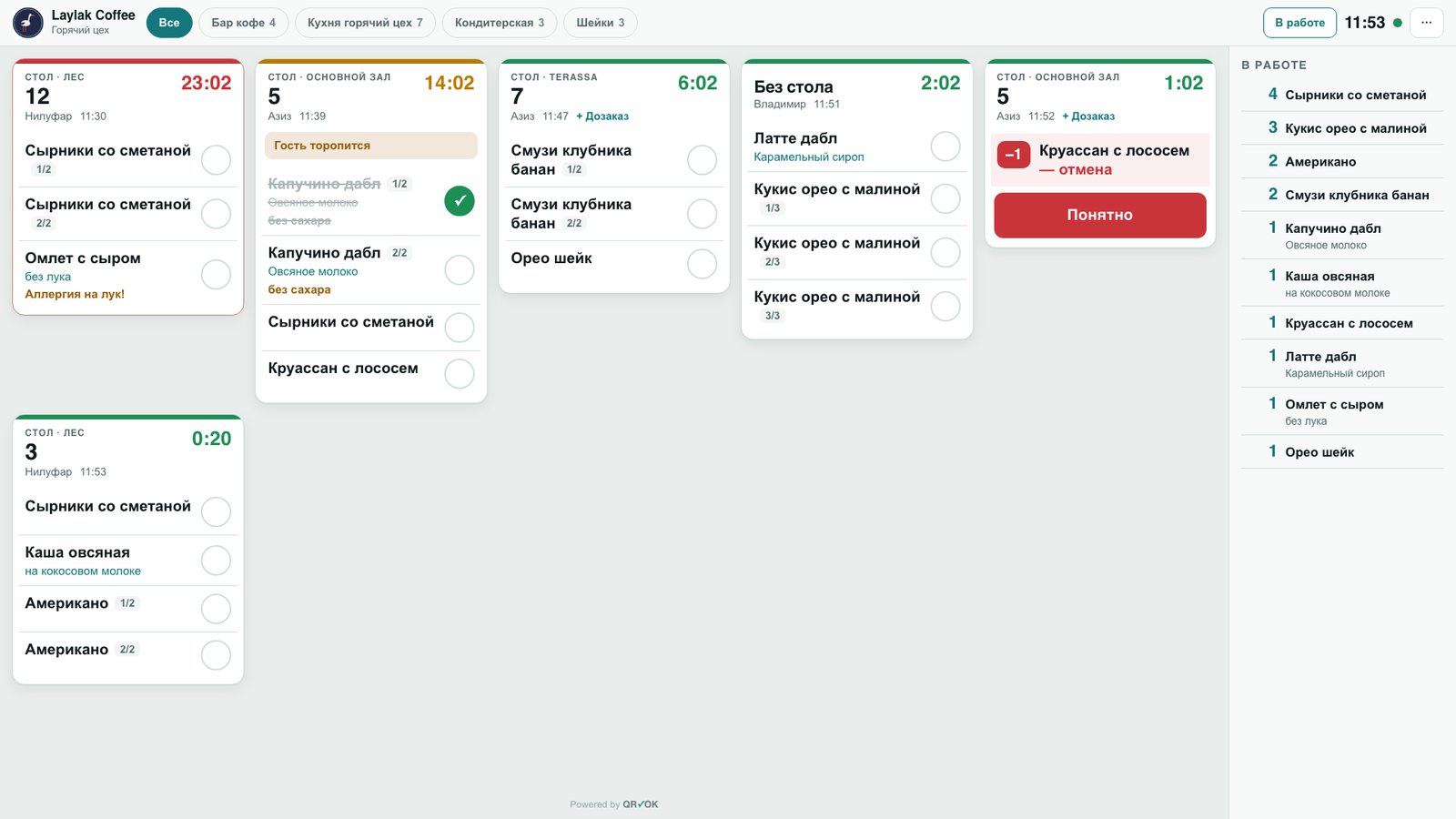
Everything the Poster register sent to the kitchen or the bar appears on a tablet or a TV. The cook marks dishes ready, and the waiter the order belongs to gets «Ready» on their phone at once. Instead of paper tickets and Poster's Kitchen Kit.
What is on the screen
- A card for every send to the kitchen — the table, the time, the dishes with their modifiers and comments. A follow-up order for the same table comes as its own card marked «More». New orders come with a sound.
- Poster's workshops. Tabs at the top by workshop — «All», «Bar», «Hot kitchen»: a cook sees only their own.
- «To make» — a summary of how many of each dish are being made, to cook them in a batch.
- Ready dish by dish. Each dish is marked on its own; the last one closes the card, and «Undo» takes a wrong tap back. «Ready in the last 2 hours» is the history.
- No connection — the screen says so itself and refreshes the orders once it is back.
Two kinds of screens
- Work screen — a tablet where the cook marks «Ready». The waiter gets a notice on the phone. 60,000 UZS a month per screen.
- Monitor — a TV or a second screen over the pass: the same orders without buttons. Free, as many as you like.
How to connect
- On the tablet or the TV open qrok.uz/kitchen in the browser — a code appears on the screen.
- The manager opens the cabinet in the bot @qrokuzbot → «Kitchen» → «Connect a screen», types the code, names the screen (for example, «Hot kitchen») and picks: work screen or monitor.
- On the screen press «Start» — it will not go dark, and new orders come with a sound.
You need a Poster register with QR✓OK connected: orders come from Poster by themselves, nothing to set up at the register. A screen is disconnected in the same «Kitchen» section; bringing it back takes a new code.
Connect on Poster How the waiter gets «Ready»
 QR✓OK
Connect your venueConnect